Testing
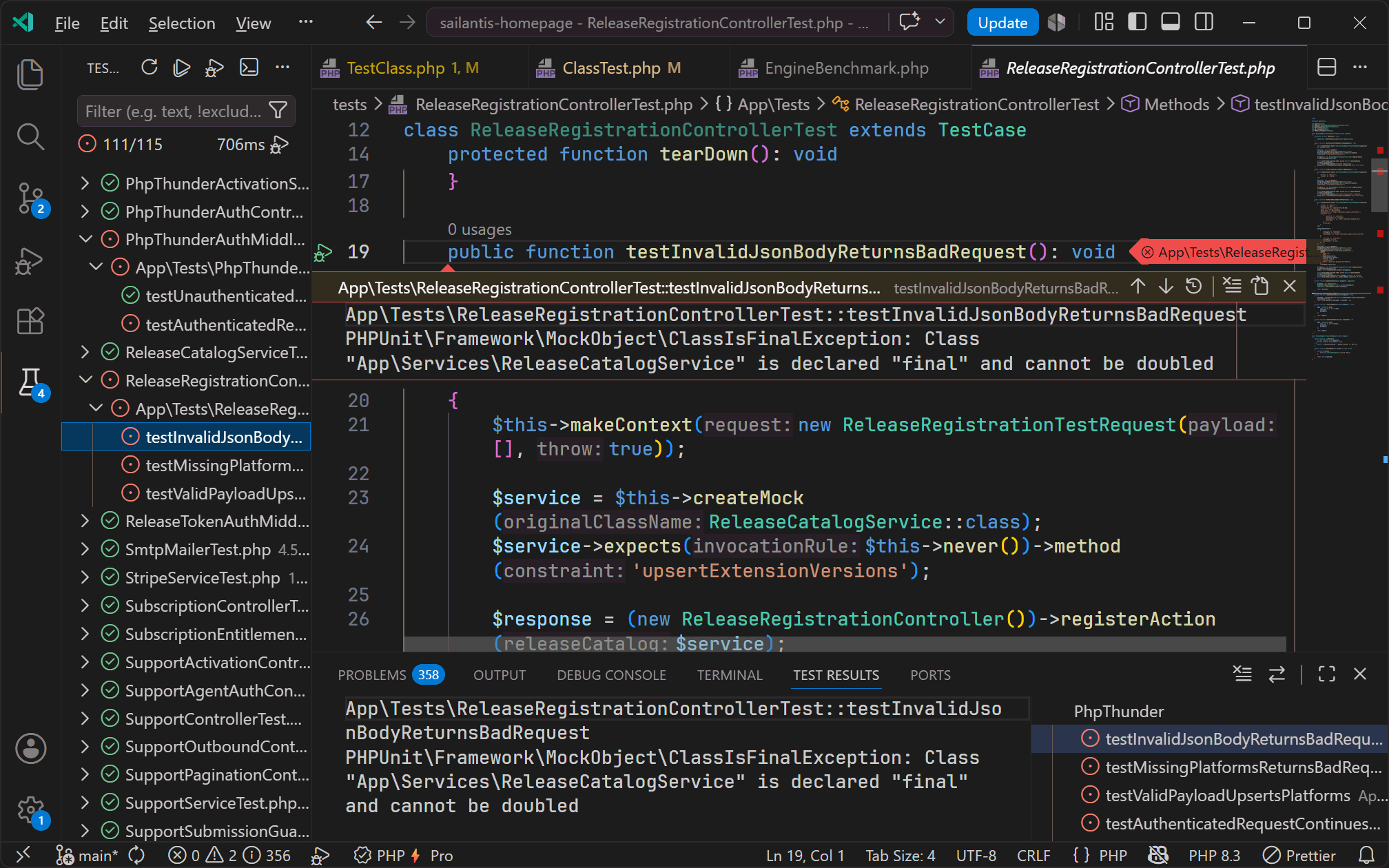
PhpThunder integrates with the VS Code Test Explorer and discovers both PHPUnit and Pest tests automatically. The result is a visual test tree, one-click run and debug, and live pass/fail feedback — all without leaving the editor or touching the terminal.
What the Test Explorer shows
Once PhpThunder discovers the tests, the Test Explorer panel organizes them into a hierarchy:
- PHPUnit: grouped by test class, then by test method. Dataset-driven tests appear as individual children under their parent method.
- Pest: grouped by
describeblock when one exists, otherwise by test name. Dataset entries are shown as individual children.
A mixed PHPUnit + Pest project works fine — both appear in the same tree.
Running tests
Use the standard VS Code Test Explorer UI:
- Click the ▶ Run button next to a suite, class, or individual test
- Use
Ctrl+; Ctrl+Ato run all tests in the workspace - Click the ▶ icon in the editor gutter next to a test method to run just that one
Tip: The gutter icon is one of the fastest ways to run a single test during editing. Click it once to run, or right-click to get the "Debug Test" option.
PHPUnit vs Pest discovery
PhpThunder handles the two runners differently because their project layouts differ:
| PHPUnit | Pest | |
|---|---|---|
| Discovery source | Class-based test files | File-based test() / it() calls |
| Grouping | By test class | By describe block or top-level |
| Config file | phpunit.xml / phpunit.xml.dist |
Same — Pest wraps PHPUnit internally |
| Auto-detected binary | vendor/bin/phpunit |
vendor/bin/pest |
The auto runner setting prefers Pest when vendor/bin/pest exists and falls back to PHPUnit otherwise.
Debugging tests
PhpThunder provides a Debug Tests profile in the Test Explorer. It uses:
- The active PhpThunder interpreter for the workspace
- The configured test runner
- The PhpThunder Xdebug debugger
Right-click any test in the tree and choose Debug Test, or use the debug gutter icon. PhpThunder starts the test with Xdebug and pauses on any breakpoints in place.
If debug test runs don't start, treat it like a regular Xdebug setup issue — see Debugging.
Test runner setting
{
  "phpThunder.testRunner": "auto"
}
| Value | Behavior |
|---|---|
auto |
Prefer Pest if vendor/bin/pest exists, otherwise PHPUnit |
phpunit |
Always use PHPUnit |
pest |
Always use Pest |
Use auto unless the project has an unusual layout or a specific runner must be forced.
Tips for reliable discovery
- Open the project root — the folder that contains
composer.json— not a nested subfolder. - Run
composer installbefore opening the project sovendor/bin/phpunitandvendor/bin/pestexist. - Reindex the project after major structural changes (
PhpThunder: Reindex Workspace). - Keep the PHP version setting aligned with what the project actually targets to avoid false diagnostics in test files.
When tests don't appear
Work through this checklist:
vendor/bin/phpunitorvendor/bin/pestexists in the workspacephpThunder.testRunnermatches the project's actual runner- The workspace folder is the project root (not a src/ subdirectory)
- The selected PHP interpreter can execute the test binary
- The project has at least one file that follows the expected test naming convention
Next steps
- Project configuration — runner and interpreter settings in detail
- Debugging — if debug test runs fail to connect
- Troubleshooting — if the Test Explorer stays empty after setup